
最新的Microsoft Word (Word and Word 2019) (MO-100日本語版) - MO-100日本語免費考試真題
「Depaning」セクションで、「マフィントレイはまだ熱いです!」というフレーズの前に温度計の記号を挿入します。 Webdingsフォントと文字コード「225」(温度計の記号)を使用します。
正確答案:
You might want to insert a degree symbol when you write about temperatures or measurements in Word. You can do this by using the Symbol drop-down menu or the keyboard shortcut, Alt + 0176
「お気に入りの恐竜」セクションのページの最後にある空白の段落で、3Dモデル機能を使用して3Dオブジェクトフォルダーからトリケラトプスを挿入します。
モデルをテキストに合わせて配置します。
モデルをテキストに合わせて配置します。
正確答案:
On the Insert tab, in the Illustrations group, click 3D Models > From a File.
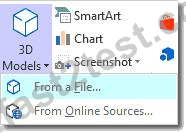
Navigate to where your 3D object is, select it and click Insert. Once inserted and still selected, you will see some handles with which to manipulate the object.

These handles look like the usual ones that allow you to resize and rotate an object. However, if you hover your mouse roughly over the centre of the object, you should see the cursor change shape to indicate that you can rotate the model in 3D space. Like this:

Once you have rotated the model, the 3D rotate handle will appear in the centre of the object and using this will make it easier to rotate the object.
While the object is selected, you will see the 3D Model Tools contextual tab displayed in the ribbon.
Navigate to where your 3D object is, select it and click Insert. Once inserted and still selected, you will see some handles with which to manipulate the object.
These handles look like the usual ones that allow you to resize and rotate an object. However, if you hover your mouse roughly over the centre of the object, you should see the cursor change shape to indicate that you can rotate the model in 3D space. Like this:
Once you have rotated the model, the 3D rotate handle will appear in the centre of the object and using this will make it easier to rotate the object.
While the object is selected, you will see the 3D Model Tools contextual tab displayed in the ribbon.
ドキュメントの最後で、最後の2つの段落の行間隔を正確に14ポイントに変更します。
正確答案:
Select Last two paragraphs to update. ...
Go to Home > Line and Paragraph Spacing.
Select Line Spacing Options and choose an option in the Line spacing box.
Adjust the Before and After settings to change spacing between paragraphs.
Select OK.
Go to Home > Line and Paragraph Spacing.
Select Line Spacing Options and choose an option in the Line spacing box.
Adjust the Before and After settings to change spacing between paragraphs.
Select OK.
[提供]セクションで、画像のテキストの折り返しを[正方形]に変更します。
正確答案:
Select the picture.
Select Layout Options.
Select the layout you want.
Select Layout Options.
Select the layout you want.