

立即下載 Microsoft : 77-882 考試題庫

即时下載:我們的系統會在付款後的一分鐘內自动將您購買的產品發送給您。(如果在12小時內沒有收到,請聯繫我們。注意:不要忘記檢查你的垃圾郵件。)
100%退款保證
Fast2test在我們的客戶中擁有前所未有的99.6%的首次通過率。 我們對我們的產品非常有信心,所以我們不提供会给客户带去麻煩的產品。
- 高品质的認證考試培訓材料
- 有三個版本可供選擇
- 10年的行業經驗
- 365天免費更新
- 隨時隨地練習
- 100%安全的購物體驗
77-882 電子檔(PDF)
- 可打印的PDF格式
- 简单清晰方便阅读
- 可以任意拷贝到不同设备
- 隨時隨地學習
- 支持所有的PDF阅读器
- 購買前可下載免費試用
- 下載免費DEMO
- 問題數量: 90
- 最近更新時間: 2026-09-12
- 價格: $59.98
77-882 軟體版
- 可执行的應用程序
- 模擬真實的考試環境
- 增加考試信心,增强记忆力
- 支持所有Windows操作系統
- 兩種练习模式随意使用
- 隨時離線練習
- 軟體版屏幕截圖
- 問題數量: 90
- 最近更新時間: 2026-09-12
- 價格: $59.98
77-882 線上測試引擎
- 網上模擬真實考試,方便,易用
- 無需安裝,即時使用
- 支持所有的Web瀏覽器
- 支持離線緩存
- 有測試歷史記錄和技能評估
- 支持Windows / Mac / Android / iOS等
- 試用線上測試引擎
- 問題數量: 90
- 最近更新時間: 2026-09-12
- 價格: $59.98
距離 Microsoft Excel 2010 考試的日子越來越近,卻總覺得複習進度追不上計畫?Fast2test 的 77-882 題庫收錄 90 道練習題,幫助你把有限的備考時間用在真正會出題的重點上。
Microsoft 77-882 考試概覽:
| 認證廠商: | Microsoft |
|---|---|
| 考試名稱: | Microsoft Office Excel 2010 Expert |
| 考試代碼: | 77-882 |
| 實際考試題數: | 40-50 個實作題 (視情況而定) |
| 及格分數: | 700 (總分 1000 分) |
| 證照有效期限: | 無效期限制 (MOS 2010 認證不會過期) |
| 考試時間: | 50 分鐘 |
| 考試費用: | USD 100-150 (因地區而異) |
| 相關認證: | Microsoft Office Specialist Excel 2010 Core (77-882 為 Expert 路線;Core 為 77-882? / 77-882 Expert 與 Excel 2010 Core 配對,77-882 為 Expert 第一部分,具體取決於地區命名) |
| 考試形式: | Microsoft Excel 2010 即時環境模擬, 實作題 |
| 支援語言: | Spanish, English, French, Japanese, German |
| 推薦課程: | Microsoft Learn - Excel 培訓 MOS 官方學習指南 (Excel 2010 Expert) |
| 考試報名: | Microsoft 認證儀表板 Pearson VUE Microsoft 考試 |
| 範例考題: | Microsoft 77-882 範例考題 |
| 考試方式: | 透過授權測試中心 (Pearson VUE) 進行監考考試或線上監考 (可用性因地區而異) |
| 必備條件: | 建議:具備 Microsoft Office Specialist Excel 2010 Core 認證或同等 Excel 2010 使用經驗 |
| 官方大綱網址: | https://learn.microsoft.com/en-us/credentials/certifications/mos-excel-expert-2010/ |
Microsoft 77-882 考試大綱主題:
| 章節 | 目標 |
|---|---|
| 建立進階公式 | - 使用公式分析數據
|
| 套用自訂格式與版面配置 | - 套用進階格式設定
|
| 管理與呈現數據 | - 匯入與匯出數據
|
| 管理活頁簿選項與設定 | - 自訂活頁簿環境
|
Microsoft 77-882 考試疑問總整理
77-882(Microsoft Excel 2010)是由 Microsoft 舉辦的認證考試,通過後可取得 Microsoft Office Specialist (MOS) Excel 2010 Expert 認證,此認證屬於 Professional 等級,適合想在該領域深耕的從業人員報考。與此考試相關的認證還包括 Microsoft Office Specialist Excel 2010 Core (77-882 為 Expert 路線;Core 為 77-882? / 77-882 Expert 與 Excel 2010 Core 配對,77-882 為 Expert 第一部分,具體取決於地區命名),可依職涯規劃進一步挑戰。備考時搭配 Fast2test 的 90 道練習題,能更快掌握出題方向。
Microsoft Excel 2010 的題量為 40-50 個實作題 (視情況而定),考試時間為 50 分鐘。換算下來,每題可用的思考時間相當有限,遇到卡關的題目建議先標記、整卷答完後再回頭檢查,避免在單一題目上耗掉過多時間。平時可用 Fast2test 的模擬考功能進行限時練習,提前適應正式考試的答題節奏與時間壓力。
Microsoft Excel 2010 的通過分數為 700 (總分 1000 分),官方報名費為 USD 100-150 (因地區而異)。需要注意的是,若未能一次通過,重考必須再次支付全額報名費,成本不低。建議正式報名前,先用 Fast2test 的 90 道模擬試題做幾回完整自測,確認成績穩定達標後再上考場。
Microsoft Excel 2010 的報考條件如下:建議:具備 Microsoft Office Specialist Excel 2010 Core 認證或同等 Excel 2010 使用經驗。報名前建議再到官方頁面確認最新規定:https://learn.microsoft.com/en-us/credentials/certifications/mos-excel-expert-2010/。
Microsoft Excel 2010 可透過以下管道完成報名:
考試方式:透過授權測試中心 (Pearson VUE) 進行監考考試或線上監考 (可用性因地區而異)。
Microsoft 官方為 Microsoft Excel 2010 推薦了以下培訓資源:
完成官方課程後,別忘了用 Fast2test 的 90 道 77-882 練習題驗收學習成果,找出還不熟悉的知識點,才能把培訓內容真正轉化為分數。
可以。Fast2test 提供 Microsoft Excel 2010 的免費範例試題,購買前可先下載體驗,確認題庫品質符合期待再下單。購買後享有 365 天免費更新,77-882 題庫會隨官方大綱調整持續修訂;365 天到期後若仍需更新服務,可以 50% 折扣優惠續購。
Fast2test 提供「退款保證」:購買後 60 天內參加 77-882 對應考試未通過,可申請全額退款。申請時需於考後 2 天內提交報名證明(准考證 / enrollment slip)複印件與官方成績單(Score Report)PDF,且考生姓名須與付款人姓名一致,資料送出後 7 天內處理完成。提醒您:購買後 3 天內即參加考試、已下載但未實際應考,以及免費資料與過期訂單,不適用退款保證。若不想退款,也可選擇免費更換為兩個等值的考試資料,並保留原購產品的更新服務。交付方面,付款完成後系統會在一分鐘內將產品寄至您的電子郵件信箱,可即時下載使用,且不限制安裝的電腦數量;若 2 小時仍未收到,請聯絡客服協助處理。
Microsoft Excel 2010 的考試範圍涵蓋 4 大領域,主要包括 建立進階公式、套用自訂格式與版面配置、管理活頁簿選項與設定 等。各領域的細項主題與完整出題比例,請參考上方的考試大綱;安排讀書計畫時,建議依各領域占比分配複習時間,把力氣花在最關鍵的地方。
最新的 MCSA 77-882 免費考試真題:
You work in the Sales office at ABC.com. You use Microsoft Office Excel 2010 to create company sales reports.
You are creating a sales report for the first quarter of the year. You type a title "First Quarter Sales Report" into cell A1. The title appears as shown below.
You want the title to appear in one line as shown below.
How can you make the title appear on one line?
- A. You should consider deselecting the Wrap Text option.
- B. You should consider configuring the text alignment to use the Fill option.
- C. You should consider deselecting the Shrink to Fit option.
- D. You should consider selecting the Merge Cells option.
答案:A 🗳️
You work as a Sales Manager for Rainbow Inc. You are working on a report in a worksheet in
Excel 2010. You want to insert flow-chart in the sheet. Mark the option that you will choose to
insert flow- chart symbols in the report.
答案:

Explanation:
In order to accomplish the task, you will have to choose the Shapes option. Shapes are simple
objects provided by Microsoft Office to add them to a document. A single shape or combined
multiple shapes can be inserted in the document. The Office includes simple shapes, such as lines,
basic geometric shapes, arrows, equation shapes, flowchart shapes, stars, banners, and callouts.
Users can add text, bullets, numbering, and Quick Styles to these shapes after inserting them in the
document. Take the following steps to add a shape in a document:
1.Click on the Shapes option in the Illustrations group on the Insert tab. This will open the list of
shapes available in Microsoft Office.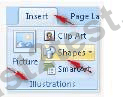
2.Choose the required shape from the list.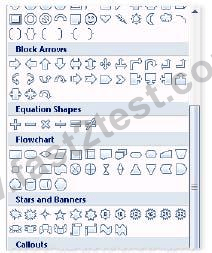
You work as a Help Desk Technician for Dreams Unlimited Inc. Martha, a Sales Manager, is
creating a sales report in Microsoft Excel. The report contains many worksheets. Martha has used
many formulas in her report. She wants to monitor a cell which contains a formul a. The formula
refers to many other cells that are located in different worksheets in the report. She wants to know
the effects on the cell when the values in different sheets changes. She requests you to help her out
to accomplish the task. Which of the following steps will you advice her to accomplish the task?
- A. Click the New Window option in the Window group on the View tab. Click the Arrange All
option in the Window group on the View tab. Select the Cascade option. - B. Select the cell which is to be monitored. On the Formulas tab in the Formula Auditing group,
click Watch Window. Click Add Watch. - C. Select the cell which is to be monitored. On the Formulas tab in the Formula Auditing group,
click Evaluate Formula. - D. Click the New Window option in the Window group on the View tab. Click the Arrange All
option in the Window group on the View tab. Select the Vertical option.
答案:B 🗳️
說明:(僅 Fast2test 成員可見)
You work as an Office Assistant at ABC.com. You are using Microsoft Office Excel 2010 to edit a workbook.
The workbook has twelve worksheets. The worksheets are named January through December and have rows labeled according to each day of the month.
You want to enter a value in the cell B2 on each worksheet.
What is the easiest way to insert the same value into the same cell on all worksheets in a workbook?
- A. Use the Select All Sheets function and enter the value into cell B2 on the active sheet.
- B. Use the Select All Sheets function. Click one of the sheets and enter the value into cell B2.
- C. Enter the value into cell B2 on the first sheet then use Copy and Paste to paste the value into the other sheets.
- D. Configure a 3-D Cell Reference then enter the value into cell B2 on the first sheet.
答案:A 🗳️
 920條客戶評論客戶反饋 (*一些類似或舊的評論已被隱藏。)
用過之后,你們的題庫非常好,我輕而易舉地通過了77-882考試,謝謝!

106.147.207.*

你們的學習指南真的對我提供很大的幫助,它讓我獲得了77-882認證!

223.138.221.*
這考古題很好,我通過了第一次嘗試參加的77-882認證考試,它涵蓋了我需要知道的考試題庫,幫助我輕松通過!

123.193.22.*
感謝你們網站提供的 77-882 考試認證資料,我很容易的通過了我的首次考試。

187.235.156.*
我簡直不敢相信,我通過77-882考試這么容易,這當然也是我最想要的結果。以后的認證考試,我還會在選擇Fast2test網站!

114.136.161.*
這考古題很好,我通過了第一次嘗試參加的77-882認證考試,它涵蓋了我需要知道的考試題庫,幫助我輕松通過!

192.11.39.*
兩個月之前,我買過你們的77-882考試資料,該資料寫的很好,非常容易理解,然后我也通過了考試。這次,我在為我下個月的70-768考試做準備,依然選擇Fast2test Microsoft考試資料,祝我好運,我相信能輕松通過!

123.192.144.*
今天通過了77-882的考試,選擇題跟我看的Fast2test的77-882擬真試題差不多,只有三道新題,實驗題是一模一樣。但是建議大家考試的時候,把題看清楚了,不能完全按照擬真試題中的命令去做。要靈活運用,積極思考,不能死搬硬套。

61.230.192.*
由于這個77-882考試的失敗率很高,考試成本很高,所以我選擇了Fast2test,這樣成功率會大很多。我不敢相信,我獲得了不錯的分數,非常感謝!

123.193.243.*

已經成功的通過了77-882考試,打算在購買70-768,能給我折扣嗎?我希望它很便宜。

111.81.117.*
今天我通過了考試,不得不說Fast2test網站的考試題庫是真的很有幫助。

116.48.134.*
仍然有效的考古題,今天通過77-882考試,多虧了使用Fast2test Microsoft的77-882考試題庫資料,讓我的考試變的很輕松!

216.15.18.*
這是一個對77-882考試來說非常不錯的學習指南,使我輕松獲得了Microsoft認證!

114.54.30.*
很不錯的題庫為考試做準備,讓我在很短的時間內通過了77-882考試,謝謝Fast2test網站對我的幫助!

113.116.194.*
相關考試
立即下載 77-882
付款後,我們的系統會在付款後壹分鐘內將您購買的產品發送到郵箱。如2小時內未收到,請與我們聯系。
365天免費更新
購買後365天內可免費升級。365天之後,您將獲得50%的更新折扣。

退款保證
如果您在購買後60天內沒有通過相應的考試,可以全額退款。並且免費獲得任何其他產品。
安全與隱私
我們尊重客戶的隱私。 我們使用McAfee的安全服務為您的個人信息提供最高安全性,讓您高枕無憂。
