
最新的RedHat Red Hat Certified Engineer (RHCE) exam for Red Hat Enterprise Linux 8 - EX294免費考試真題
Rekey an existing Ansible vault as follows:
-----------------------------------------------
* Download Ansible vault from http:// classroom.example.com /secret.yml to /home/
admin/ansible/
* The current vault password is curabete
* The new vault password is newvare
* The vault remains in an encrypted state with the new password
-----------------------------------------------
* Download Ansible vault from http:// classroom.example.com /secret.yml to /home/
admin/ansible/
* The current vault password is curabete
* The new vault password is newvare
* The vault remains in an encrypted state with the new password
正確答案:
Solution as:
# pwd
/home/admin/ansible/
# wget http://classroom.example.com/secret.yml
# chmod 0600 newpassword.txt
# ansible-vault rekey vault.yml --new-vault-password-file=newpassword.txt
# pwd
/home/admin/ansible/
# wget http://classroom.example.com/secret.yml
# chmod 0600 newpassword.txt
# ansible-vault rekey vault.yml --new-vault-password-file=newpassword.txt
Create a playbook called issue.yml in /home/sandy/ansible which changes the file /etc/issue on all managed nodes: If host is a member of (lev then write "Development" If host is a member of test then write "Test" If host is a member of prod then write "Production"
正確答案:
Solution as:

Modify file content.
------------------------
Create a playbook called /home/admin/ansible/modify.yml as follows:
* The playbook runs on all inventory hosts
* The playbook replaces the contents of /etc/issue with a single line of text as
follows:
--> On hosts in the dev host group, the line reads: "Development"
--> On hosts in the test host group, the line reads: "Test"
--> On hosts in the prod host group, the line reads: "Production"
------------------------
Create a playbook called /home/admin/ansible/modify.yml as follows:
* The playbook runs on all inventory hosts
* The playbook replaces the contents of /etc/issue with a single line of text as
follows:
--> On hosts in the dev host group, the line reads: "Development"
--> On hosts in the test host group, the line reads: "Test"
--> On hosts in the prod host group, the line reads: "Production"
正確答案:
Solution as:
# pwd
/home/admin/ansible
# vim modify.yml
---
- name:
hosts: all
tasks:
- name:
copy:
content: "Development"
dest: /etc/issue
when: inventory_hostname in groups['dev']
- name:
copy:
content: "Test"
dest: /etc/issue
when: inventory_hostname in groups['test']
- name:
copy:
content: "Production"
dest: /etc/issue
when: inventory_hostname in groups['prod']
:wq
# ansible-playbook modify.yml --syntax-check
# ansible-playbook modify.yml
# pwd
/home/admin/ansible
# vim modify.yml
---
- name:
hosts: all
tasks:
- name:
copy:
content: "Development"
dest: /etc/issue
when: inventory_hostname in groups['dev']
- name:
copy:
content: "Test"
dest: /etc/issue
when: inventory_hostname in groups['test']
- name:
copy:
content: "Production"
dest: /etc/issue
when: inventory_hostname in groups['prod']
:wq
# ansible-playbook modify.yml --syntax-check
# ansible-playbook modify.yml
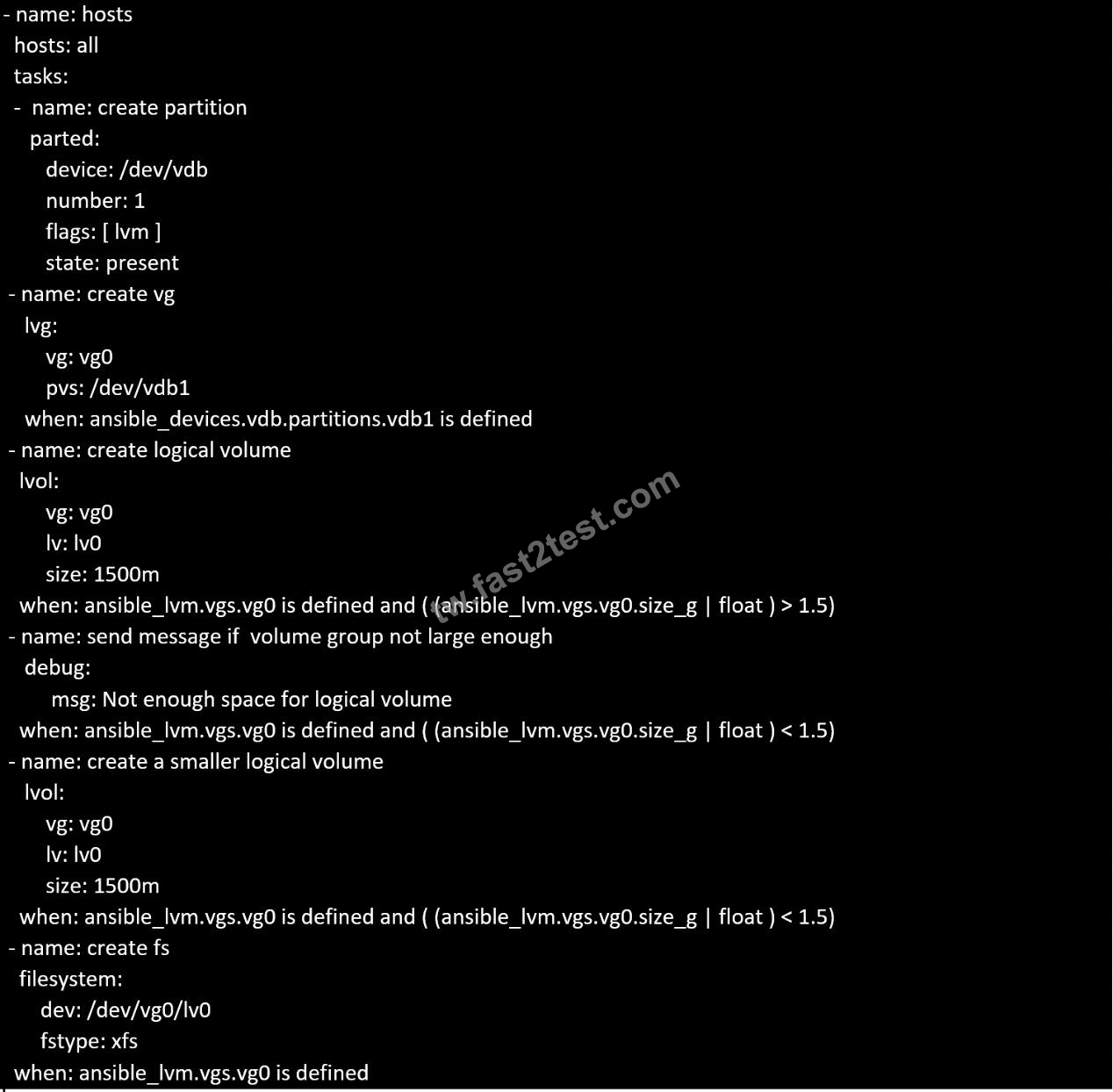
In /home/sandy/ansible/ create a playbook called logvol.yml. In the play create a logical volume called Iv0 and make it of size 1500MiB on volume group vgO If there is not enough space in the volume group print a message "Not enough space for logical volume" and then make a 800MiB Iv0 instead. If the volume group still doesn't exist, create a message "Volume group doesn't exist" Create an xfs filesystem on all Iv0 logical volumes. Don't mount the logical volume.
正確答案:
Solution as:
Topic 1, LAB SETUP
You will need to set up your lab by creating 5 managed nodes and one control node.
So 6 machines total. Download the free RHEL8 iso from Red Hat Developers website.
***Control node you need to set up***
You need to create some static ips on your managed nodes then on the control node set them up in the
/etc/hosts file as follows:
vim /etc/hosts
10.0.2.21 node1.example.com
10.0.2.22 node2.example.com
10.0.2.23 node3.example.com
10.0.2.24 node4.example.com
10.0.2.25 node5.example.com
yum -y install ansible
useradd ansible
echo password | passwd --stdin ansible
echo "ansible ALL=(ALL) NOPASSWD:ALL
su - ansible; ssh-keygen
ssh-copy-id node1.example.com
ssh-copy-id node2.example.com
ssh-copy-id node3.example.com
ssh-copy-id node4.example.com
ssh-copy-id node5.example.com
***Each manage node setup***
First, add an extra 2GB virtual harddisk to each control node 1,2,3. Then add an extra hard disk to control
node 4. Do not add an extra hard disk to node 5. When you start up these machines the extra disks should be
automatically located at /dev/sdb (or /dev/vdb depending on your hypervisor).
useradd ansible
echo password | passwd --stdin ansible
echo "ansible ALL=(ALL) NOPASSWD:ALL" > /etc/sudoers.d/ansible
Note python3 should be installed by default, however if it is not then on both the control node and managed
nodes you can install it also set the default python3 if you are having trouble with python2 being the default.
yum -y install python3
alternatives --set python /usr/bin/python3
All machines need the repos available. You did this in RHSCA. To set up locally you just need to do the same
for each machine. Attach the rhel8 iso as a disk to virtualbox, kvm or whatever hypervisor you are using (this
will be /dev/sr0). Then inside the machine:
mount /dev/sr0 to /mnt
Then you will have all the files from the iso in /mnt.
mkdir /repo
cp -r /mnt /repo
vim /etc/yum.repos.d/base.repo
Inside this file:
[baseos]
name=baseos
baseurl=file:///repo/BaseOS
gpgcheck=0
Also the appstream
vim /etc/yum.repos.d/appstream.repo
Inside this file:
[appstream]
name=appstream
baseurl=file:///repo/AppStream
gpgcheck=0
Topic 1, LAB SETUP
You will need to set up your lab by creating 5 managed nodes and one control node.
So 6 machines total. Download the free RHEL8 iso from Red Hat Developers website.
***Control node you need to set up***
You need to create some static ips on your managed nodes then on the control node set them up in the
/etc/hosts file as follows:
vim /etc/hosts
10.0.2.21 node1.example.com
10.0.2.22 node2.example.com
10.0.2.23 node3.example.com
10.0.2.24 node4.example.com
10.0.2.25 node5.example.com
yum -y install ansible
useradd ansible
echo password | passwd --stdin ansible
echo "ansible ALL=(ALL) NOPASSWD:ALL
su - ansible; ssh-keygen
ssh-copy-id node1.example.com
ssh-copy-id node2.example.com
ssh-copy-id node3.example.com
ssh-copy-id node4.example.com
ssh-copy-id node5.example.com
***Each manage node setup***
First, add an extra 2GB virtual harddisk to each control node 1,2,3. Then add an extra hard disk to control
node 4. Do not add an extra hard disk to node 5. When you start up these machines the extra disks should be
automatically located at /dev/sdb (or /dev/vdb depending on your hypervisor).
useradd ansible
echo password | passwd --stdin ansible
echo "ansible ALL=(ALL) NOPASSWD:ALL" > /etc/sudoers.d/ansible
Note python3 should be installed by default, however if it is not then on both the control node and managed
nodes you can install it also set the default python3 if you are having trouble with python2 being the default.
yum -y install python3
alternatives --set python /usr/bin/python3
All machines need the repos available. You did this in RHSCA. To set up locally you just need to do the same
for each machine. Attach the rhel8 iso as a disk to virtualbox, kvm or whatever hypervisor you are using (this
will be /dev/sr0). Then inside the machine:
mount /dev/sr0 to /mnt
Then you will have all the files from the iso in /mnt.
mkdir /repo
cp -r /mnt /repo
vim /etc/yum.repos.d/base.repo
Inside this file:
[baseos]
name=baseos
baseurl=file:///repo/BaseOS
gpgcheck=0
Also the appstream
vim /etc/yum.repos.d/appstream.repo
Inside this file:
[appstream]
name=appstream
baseurl=file:///repo/AppStream
gpgcheck=0