
最新的Adobe Certified Expert - Magento Commerce Cloud Developer - AD0-E706免費考試真題
You built a custom command that runs during the build phase, but it is not generating files property Magento Support provided a patch that you added to theproject What must you do to ensure this command runs after the patch has been applied?
正確答案: C
You added a grunt autoprefixer command, which adds CSS vendorprefix like -webkit- and -moz- to CSS files generated by the setup:static-connect: deploy command.
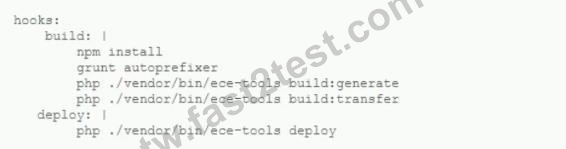
After deployment you still see CSS files without prefixes. The hooks section in the .magento. app. Yaml file is:
Considering static assets are being generated on the build phase why are CSS prefixes missing?
After deployment you still see CSS files without prefixes. The hooks section in the .magento. app. Yaml file is:
Considering static assets are being generated on the build phase why are CSS prefixes missing?
正確答案: B
You are reviewing a third party extension for Magento Commerce Cloud compatibility You discover the module writes to a custom directory called internal/ within the Magento base directory The directory has to be shared by all web servers What do you do so the module can be used on Magento Commerce Cloud?
正確答案: D
Magento Support advises you lo upgrade to the latest release of ece-tools matching the project's Magento Commerce version 2 3 1 How do you do that?
正確答案: C
You want to exclude some themes from static assets generation only for integration environments You are trying to choose where to set the scd_exclude_themes variable in the . magento.env.yaml tile or in the Project WeD Ul.
What prevents the usage of the . magento. env.yaml file?
What prevents the usage of the . magento. env.yaml file?
正確答案: C
You are working with a new developer who needs to be able to deploy code and view logs on MagentoCommerce Cloud 60.
What must you do to give them access?
What must you do to give them access?
正確答案: C
You are updating a Magento Commerce Cloud project from version 2.2.5 to 2.3.0 with the command Composer require magento/product-enterprise-edition:2,3,0 However, composer is unable to complete the task because the installed version of magento/magento-cloud-metapackage is not compatible.
How do you upgrade magento to the desired version?
How do you upgrade magento to the desired version?
正確答案: D