
最新的Microsoft Core Solutions of Microsoft SharePoint Server 2013 (070-331日本語版) - 070-331日本語免費考試真題
DRAG DROP


正確答案:

Explanation:

HOTSPOT
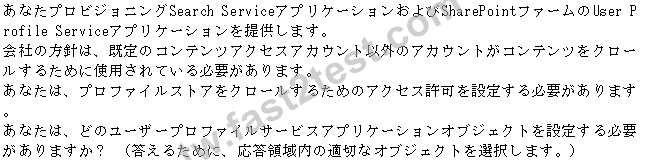

正確答案:

HOTSPOT


正確答案:

Explanation:

* In Central Administration, you can only configure claims-based authentication when you manage web applications. You can also use Windows PowerShell cmdlets
HOTSPOT


正確答案:

Explanation:
Usage and health data collection

Note:
*SharePoint 2013 writes usage and health data to the logging folder and to the logging
database. You can use the SharePoint Central Administration website to configure health
data collection settings.
*See step 3 (and 9 - note the reference to SQL authentication).
Configure usage and health data collection by using Central Administration
The usage and health data settings are farm-wide and cannot be set for individual servers
in the farm.
To configure usage and health data collection by using Central Administration:
- Verify that you have the following administrative credentials:
The user account that performs this procedure has to be a member of the Farm
Administrators group. - In Central Administration, on the home page, click Monitoring. - On the Monitoring page, in the Reporting section, click Configure usage and health data collection. - On the Configure usage and health data collection page, in the Usage Data Collection section, select the Enable usage data collection check box. - In the Event Selection section, select the check boxes of the events that you want to log. - In the Usage Data Collection Settings section, type the path of the folder to which you want usage and health information to be written in the Log file location box. The path that you specify must exist on each server in the farm.
These settings are applied to all events. - In the Health Data Collection section, select the Enable health data collection
check box. To change the collection schedules, click Health Logging Schedule.
- To change log collection schedules, click Log Collection Schedule, and then click any of the timer jobs to change its schedule, or disable that timer job. If you disable a timer job, it stops collecting corresponding log data.
- In the Logging Database Server section, to change the authentication method, select either the Windows authentication or SQL authentication option.

正確答案: C,E
說明:(僅 Fast2test 成員可見)
DRAG DROP


正確答案:

Explanation:
*The Publishing site collection is on the perimeter network.
*Marketing, Sales, and the Customer realtionships department work on the Authoring site collection in the local network.
*The Marketing department works with the Pages library as they are responsible for creating the web page content.
*The Sales department works with the Document library as they work with a product catalog.
*The customer relationship department makes sure clients and vendors get access so they work with lists.
DRAG DROP



正確答案:

Explanation:
Box 1:

Box 2:

Box 3:

Note:
* Get-SPEnterpriseSearchServiceApplication Returns the search service application for a farm.
------------------EXAMPLE------------------
$ssa = Get-SPEnterpriseSearchServiceApplication -Identity MySSA
This example obtains a reference to a search service application namedMySSA.
Example2:
-----------------EXAMPLE------------------
$searchapp = Get-SPEnterpriseSearchServiceApplication" SearchApp1" $contentsource =
Get-SPEnterpriseSearchCrawlContentSource -SearchApplication $searchapp -Identity
"Local SharePoint Sites" $contentsource.StartFullCrawl()
This example retrieves the default content source for the search service application,
SearchApp1, and starts a full crawl on the content source.
DRAG DROP


正確答案:

Explanation:
*There is a new permission level, "View Web Analytics Data" that will allow users to access these reports without having to give them Administrator privileges.
*Use Client Integration features Use features that start client applications. Without this permission, users must work on documents locally and then upload their changes.

正確答案: A,D
說明:(僅 Fast2test 成員可見)