

超過 63263+ 位滿意的客戶
最新的高品質 ECDL-ADVANCED 考試練習題庫

即时下載:我們的系統會在付款後的一分鐘內自动將您購買的產品發送給您。(如果在12小時內沒有收到,請聯繫我們。注意:不要忘記檢查你的垃圾郵件。)
100%退款保證
Fast2test在我們的客戶中擁有前所未有的99.6%的首次通過率。 我們對我們的產品非常有信心,所以我們不提供会给客户带去麻煩的產品。
- 高品质的認證考試培訓材料
- 有三個版本可供選擇
- 10年的行業經驗
- 365天免費更新
- 隨時隨地練習
- 100%安全的購物體驗

- 可执行的應用程序
- 模擬真實的考試環境
- 增加考試信心,增强记忆力
- 支持所有Windows操作系統
- 兩種练习模式随意使用
- 隨時離線練習

- 網上模擬真實考試,方便,易用
- 無需安裝,即時使用
- 支持所有的Web瀏覽器
- 支持離線緩存
- 有測試歷史記錄和技能評估
- 支持Windows / Mac / Android / iOS等
- 可打印的PDF格式
- 简单清晰方便阅读
- 可以任意拷贝到不同设备
- 隨時隨地學習
- 支持所有的PDF阅读器
- 購買前可下載免費試用
準備考試最怕漫長的等待,Fast2test 深諳這一點。ECDL-ADVANCED 題庫在付款完成後一分鐘內即送達您的信箱,ECDL/ICDL Advanced 的 235 道練習題立刻就能開始使用。
ECDL ECDL-ADVANCED 考試概覽:
| 認證廠商: | ECDL / ICDL(國際電腦使用執照/歐洲電腦使用執照) |
|---|---|
| 考試名稱: | ECDL / ICDL 進階證書 |
| 考試代碼: | ECDL-ADVANCED |
| 考試時間: | 每單元60分鐘 |
| 及格分數: | 75%(單元及格門檻) |
| 支援語言: | 其他語言(依考試中心提供而定), 英文 |
| 相關認證: | ECDL / ICDL 專家級證書 ECDL / ICDL 標準級 ECDL / ICDL 基礎級 |
| 實際考試題數: | 依單元而定(通常為依課程大綱設計的實作題) |
| 考試形式: | 電腦化實作題 |
| 考試費用: | 依考試中心與單元而定(每單元通常約50至100歐元) |
| 證照有效期限: | 永久有效 |
| 範例考題: | ECDL ECDL-ADVANCED 範例考題 |
| 考試方式: | 經由ICDL/ECDL認可之考試中心與電腦化測驗系統辦理。 |
| 必備條件: | 無需先修資格;考生可獨立報考任一進階單元。部分考試中心建議先取得ICDL基礎級或標準級證書。 |
| 官方大綱網址: | https://www.ecdl.ch/en/schools/certificates-and-modules/ |
ECDL ECDL-ADVANCED 考試大綱主題:
| 章節 | 目標 |
|---|---|
| 主題 1: 進階資料庫(AM5) | - 表單與報表
|
| 主題 2: 進階試算表(AM4) | - 呈現與輸出
|
| 主題 3: 進階簡報製作(AM6) | - 簡報發表與檢閱
|
| 主題 4: 進階文書處理(AM3) | - 文件自動化與工作效率
|
關於 ECDL ECDL-ADVANCED 考試,您可能想問
ECDL/ICDL Advanced(考試代碼 ECDL-ADVANCED)是 ECDL 官方規劃的認證考試,通過後可取得「ECDL certification」認證,認證等級為 進階。此認證亦與 ECDL / ICDL 專家級證書、ECDL / ICDL 基礎級、ECDL / ICDL 標準級 等認證相互關聯,可依職涯規劃進一步進修。若您正準備這門考試,Fast2test 收錄的 235 道練習題能協助您有系統地複習每個知識要點。
ECDL-ADVANCED 考試的總題量為 依單元而定(通常為依課程大綱設計的實作題) 題,考試時間為 每單元60分鐘。換算下來,每題可分配的作答時間相當有限,一旦在不熟悉的題型上卡關,很容易打亂整體節奏。建議備考後期使用 Fast2test 的測試引擎進行限時模考,刻意訓練時間分配與答題速度,正式考試時才不會因時間壓力而失常。
ECDL-ADVANCED 考試的及格標準為 75%(單元及格門檻),官方報名費用為 依考試中心與單元而定(每單元通常約50至100歐元)。需要留意的是,若未達及格標準,重考時必須再次全額繳費,成本不低。建議正式報名前,先用 Fast2test 的 235 道練習題完整自測幾回,確認實力到位後再上場,避免不必要的重考支出。
無需先修資格;考生可獨立報考任一進階單元。部分考試中心建議先取得ICDL基礎級或標準級證書。由於官方可能隨時調整報考規定,建議您報名前再至 ECDL 官方考試頁面確認最新資訊,以免影響報名資格。
可以。Fast2test 提供 ECDL/ICDL Advanced 的免費範例試題,您可先下載體驗題目品質與解析方式,滿意後再決定購買。購買後享有 365 天免費更新,期間題庫有任何修訂都可免費取得最新版本;即使產品過期,後續續購更新仍可享 50% 折扣優惠。
交付方面,Fast2test 採即時交付:付款完成後一分鐘內,下載資訊即寄送至您的電子郵件信箱,若 2 小時內仍未收到可聯絡客服協助,且產品不限制安裝的電腦數量。考試方面,我們提供退款保證:購買後 60 天內參加對應考試而未通過者,可於考後 2 天內提交報名證明(准考證)影本與官方成績單(Score Report)PDF 申請全額退款,我們會在 7 天內處理完成;考生姓名須與付款人姓名一致,購買後 3 天內即應考、已下載但未實際應考,以及免費資料與過期訂單均不適用。若您不想退款,也可選擇免費更換為兩個等值考試資料,並保留原購產品的更新服務。
ECDL-ADVANCED 考試共劃分為 4 個主要領域,包括 進階文書處理(AM3)、進階試算表(AM4)、進階簡報製作(AM6) 等。各領域的完整細項與說明請參考上方的考試大綱,建議您依各領域的佔比高低安排複習比重,把時間花在最關鍵的主題上。
最新的 ECDL certification ECDL-ADVANCED 免費考試真題:
You work as a Database Designer for Tech Perfect Inc. The company has a Windows Vista-based computer with Microsoft Office 2010 installed on it. The computer has a database named SalaryData created in Microsoft Office Access 2010. This database has a report named SalaryReport. You have to determine bonuses based on a percentage of sales and display it in the report. For this, you want to insert an arithmetic expression in the report. Mark the tab/button that you will use to accomplish the task.
答案:

Explanation:
You should click on the Property Sheet button displayed on the Design contextual tab. It is used to insert an expression for the calculation. You can also use the Property Sheet button to define formats for dates, currency, and other numeric data.
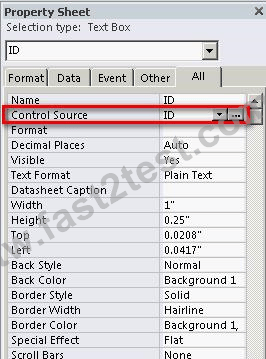
Type an expression in Expression Builder and click the OK button.
Reference:
Chapter: DATABASE, ADVANCED-LEVEL
Objective: Report Design
You work as an Office Assistant for Company Inc. You are creating a presentation in which you have applied the layout and you are using the normal view. Now you have made some changes in the layout and you want to save it with a name so that it can be used in the future. For this, you have to switch from the normal view to another view. Mark the view in the following image of the View tab to rename the layout.
答案:

Explanation:
When you add placeholders to a layout and if the content in those placeholders changes the purpose of the layout, you'll want to rename the layout. Take the following steps to rename a layout:
Click on the View tab. In the Master Views group, click Slide Master.
Right-click the layout thumbnail that you want to rename in the pane that contains the slide master and layout thumbnails.
The Rename Layout dialog box opens. In the Layout name box, enter the new name of the layout, and then click the Rename button.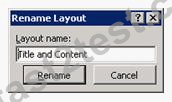
On the Slide Master tab, click Close Master View in the Close group.
Chapter: PRESENTATION, ADVANCED - LEVEL
Objective: Slides
Which of the following form contextual ribbons includes groups that can manage control groups, set text margins and padding for controls, toggle the Snap to the Grid layout feature, set tab order, align controls, and display Property Sheet?
- A. Design
- B. Format
- C. Arrange
- D. Page Setup
答案:C 🗳️
說明:(僅 Fast2test 成員可見)
Mark the option/button in the following image of the References tab to list the terms and topics that are discussed in a document, along with the pages on which they appear.
答案:

Explanation:
An index is a list of words arranged alphabetically at the end of a book. Index helps a reader to find the information quickly and easily. The words in the index given along with the page numbers where they occur to help the reader to quickly go to the desired word.Take the following steps to create an index:
Click the location where you want to add the index. Click on the References tab, and click the Insert Index button in the Index group.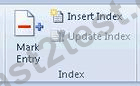
Click a design in the Formats box to use one of the available index designs. In the Formats box, click From template, and then click Modify to specify the formatting options. Select any other index options that you want to apply. Click the OK button.
Note: It is preferable to mark the entries for the index in a document before creating an index.
Chapter: ADVANCED WORD PROCESSING
Objective: Collaborative Editing
 1117條客戶評論客戶反饋 (*一些類似或舊的評論已被隱藏。)
這個題庫非常好,給我提供了ECDL的ECDL-ADVANCED考試中所包括的所有問題。

111.81.110.*

你們的ECDL-ADVANCED題庫很不錯,覆蓋了考試中95%的問題。

119.39.16.*
為了讓我順利通過ECDL-ADVANCED考試,朋友給我推薦了Fast2test網站的考試認證資料。我用了之后實在是太棒了,考試通過了。

27.106.96.*
我成功的通過了我的所有認證考試,非常感謝你們!

114.34.19.*
通過了!這是很很棒的ECDL ECDL-ADVANCED學習培訓資料。

101.10.48.*
我只花了一周的時間,就通過了 ECDL-ADVANCED 考試,里面的問題全部來自 Fast2test 考古題,除了一些小的改動。

59.127.87.*
今天,我成功的通過了我的 ECDL-ADVANCED 考試,感謝你們提供的幫助,很幸運,你們的考題是100%有用的,考試中的大多數問題都來自你們的考題。

219.137.243.*
他們說這是最新版本的,和真實的ECDL-ADVANCED考試幾乎一樣,毫無疑問通過了。

39.9.27.*
用過之后,你們的題庫非常好,我輕而易舉地通過了ECDL-ADVANCED考試,謝謝!

112.104.133.*
今天我已經通過我的ECDL-ADVANCED考試,你們的考試資料確實幫了我很多,對我非常有用。

61.221.174.*
謝謝,昨天我通過了我的 ECDL-ADVANCED 考試,你們的題庫是非常有用的,我將在我的下一次認證考試中,繼續試用你們的考古題。

124.157.109.*
他們說這是最新版本的,和真實的ECDL-ADVANCED考試幾乎一樣,毫無疑問通過了。

111.241.99.*

特別開心,今天的考試我得到了非常不錯的分數,并拿到了ECDL-ADVANCED認證。

27.32.1.*
我使用了你們網站提供的學習指南,真的很有用,我成功的通過了我的ECDL-ADVANCED考試。

223.137.97.*
上週通過了 ECDL-ADVANCED 考試,我使用的 Fast2test 學習資料幫助了我很多。我只花了30個小時學習它,這樣為我省下了大量的時間,非常感謝有你們的幫助!

60.240.24.*
憑借著Fast2test我順利通過ECDL的考試,也感謝你們及時更新ECDL-ADVANCED題庫讓我考試也能跟著同步。

202.76.26.*
之前我在為ECDL的ECDL-ADVANCED考試做準備,于是我購買了你們的考試題庫。今天,我已經通過了考試,真得太好了,我購買的題庫非常有用。

61.189.126.*
立即下載 ECDL-ADVANCED
付款後,我們的系統會在付款後壹分鐘內將您購買的產品發送到郵箱。如2小時內未收到,請與我們聯系。
365天免費更新
購買後365天內可免費升級。365天之後,您將獲得50%的更新折扣。

退款保證
如果您在購買後60天內沒有通過相應的考試,可以全額退款。並且免費獲得任何其他產品。
安全與隱私
我們尊重客戶的隱私。 我們使用McAfee的安全服務為您的個人信息提供最高安全性,讓您高枕無憂。
