
最新的ECDL/ICDL Advanced - ECDL-ADVANCED免費考試真題
You work as a Database Designer for Tech Perfect Inc. The company has a Windows Vista-based computer with Microsoft Office 2010 installed on it. The computer has a database named Exam Datasheet created in Microsoft Office Access 2010. You want to import a table named Students which is created in another database named Info. Choose and re-order the steps that you will take to accomplish the task.


正確答案:
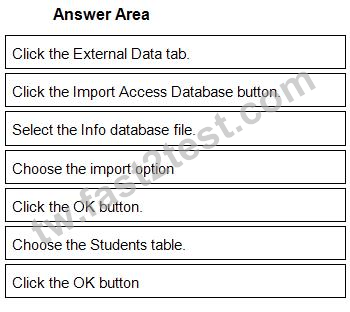
1 - Click the External Data tab.
2 - Click the Import Access Database button.
3 - Select the Info database file.
4 - Choose the import option
5 - Click the OK button.
6 - Choose the Students table.
7 - Click the OK button
Explanation:
Take the following steps to import a table from a database in Microsoft Office Access 2010:
Click the External Data tab.
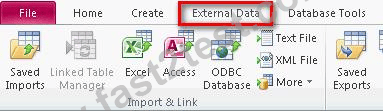
Click the Import Access Database button.

Select the database file to import.
Choose the import option and click the OK button.

Select the required tables and click the OK button.

Reference:
Chapter: DATABASE, ADVANCED-LEVEL
Objective: Import, Export and Link data
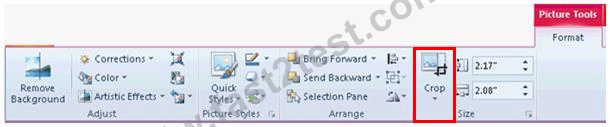
You work as an Office Assistant for Company Inc. You create a presentation and insert an image from a file in it. Now, you want to change the shape of the image, as shown in the following image:


正確答案:
Explanation:
The cropping is a process that trims vertical or horizontal edges of an object. The cropping feature is used to focus the attention on a particular area of an image. This feature helps to remove or mask areas of an image that a user can ungroup and manipulate as two or more objects or a file that stays as a single object. In PowerPoint 2010, the cropping feature has been enhanced, so that a user can now easily crop to a specific shape, crop to fit or fill a shape, or crop to a common picture aspect. Take the following steps to change the shape of an image:
1. Select the image.
2. Click the Format tab, and then click the Crop button.
3. The Crop drop-down list opens. Click the Crop to Shape option and select the shape.
Chapter: PRESENTATION, ADVANCED - LEVEL
Objective: Pictures, Images, Drawn Objects
Which of the following is the reason for occurrence of the Type mismatch in expression error?
正確答案: D
說明:(僅 Fast2test 成員可見)
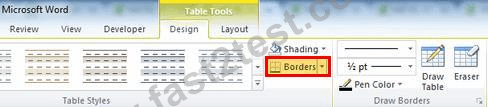
You work in an office and you are assigned the task of preparing a document. You insert a table in the document. You have a number of objects in your Word document and want to ensure proper alignment between them all. For this, you want to display gridlines of the table. Which option/button is used to display gridlines in the given image of the Design tab.

正確答案:
Explanation:
Gridlines are used to show cell boundaries of a table on the screen. These gridlines will be displayed where the table does not have borders. They appear only on the screen; they are not printed.
Chapter: ADVANCED WORD PROCESSING
Objective: Formatting
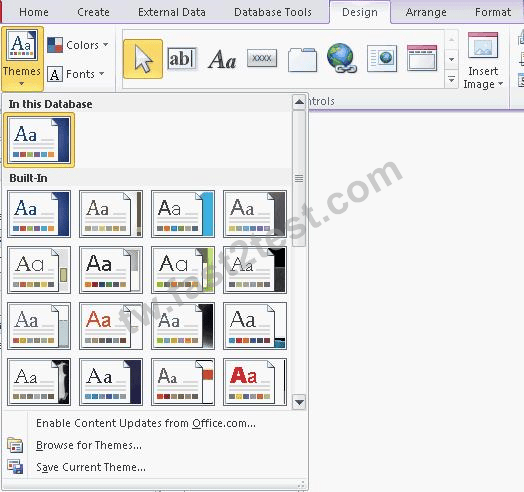
You are working on an Access form named Form-A. You want to apply a new theme to the form to provide a consistent look and feel across all its elements. Choose and re-order the steps that you will take to accomplish the task.


正確答案:

1 - Click on the Format contextual tab.
2 - Click the Themes button in the Themes group
3 - Select the desired theme effect from the drop-down list.
Explanation:
Take the following steps to change the effect of a theme:
Click on the Design contextual tab.
Click the Themes button in the Themes group.
Select the desired theme effect from the drop-down list.
Reference:
Chapter: DATABASE, ADVANCED-LEVEL
Objective: Form Design
Which of the following steps will you take to move a slide from one open presentation to another?
Each correct answer represents a complete solution. Choose all that apply.
Each correct answer represents a complete solution. Choose all that apply.
正確答案: A,C,D
說明:(僅 Fast2test 成員可見)
Which of the following properties allows a control to adjust its dimensions according to the contents present in the control?
正確答案: B
說明:(僅 Fast2test 成員可見)
Which of the following steps will you take to protect your worksheet from unauthorized access?
正確答案: A
說明:(僅 Fast2test 成員可見)
You are working on a home computer with Microsoft Office 2010 installed on it. You have created a table named Table1 in Microsoft Office Access 2010. Table1 contains a sub-datasheet named Datasheet1. You want to work with contents of this table in Excel 2010. In order to perform this task, you need to export the table. Which of the following actions will MS Access perform while exporting the table from Access to Excel?
正確答案: B
說明:(僅 Fast2test 成員可見)
In which of the following formats can the date and time be formatted?
Each correct answer represents a complete solution. Choose all that apply.
Each correct answer represents a complete solution. Choose all that apply.
正確答案: A,B,C,D
說明:(僅 Fast2test 成員可見)
Which of the following are the predefined quick styles for formatting of documents?
Each correct answer represents a complete solution. Choose all that apply.
Each correct answer represents a complete solution. Choose all that apply.
正確答案: B,C,D
You work as an Office Assistant for Company Inc. You are creating a presentation in PowerPoint 2010. You have inserted some pictures in the presentation. You want PowerPoint 2010 to use the picture file names as a placeholder for the caption text. Mark the appropriate option/button that you will use to use the file names as the caption text.

正確答案:

Explanation:
A PowerPoint photo album is a collection of photographic presentation slides. It is a presentation that a user can create to display his personal or business photographs. A user can either download PowerPoint photo album templates from Microsoft Office.com or create his own. By using a photo album, a user can use the picture file name as a placeholder for the caption text. Take the following steps to add captions to pictures:
Add a picture.

Click on the Insert tab. In the Images group, click the arrow under Photo Album, and then click the Edit Photo Album option.

In the Edit Photo Album dialog box, under Picture Options, select the Captions below ALL pictures check box. Click the Update button.
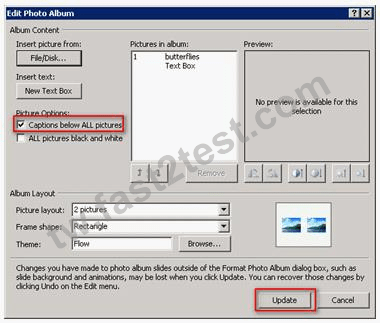
Note: By default, PowerPoint 2010 uses the picture file name as a placeholder for the caption text. In Normal view, click the caption text placeholder, and then type the caption.
Chapter: PRESENTATION, ADVANCED - LEVEL
Objective: Pictures, Images, Drawn Objects