
最新的Appian Certified Lead Developer - ACD300免費考試真題
You have created a Web API in Appian. with the following URL to call it:
https://exampleappiancloud.com/suite/webapi/usef_managefnent/ users ?username=)=john.smith.
Which is the connect syntax forreferring to the user name parameter'
https://exampleappiancloud.com/suite/webapi/usef_managefnent/ users ?username=)=john.smith.
Which is the connect syntax forreferring to the user name parameter'
正確答案: C
說明:(僅 Fast2test 成員可見)
You are selling up a new cloud environment. The customer already has a system of record for Its employees and doesn't want to re-create them in Appian. so you are going to Implement LDAP authentication.
What are the next steps to configure LDAP authentication?
To answer, move the appropriate steps from the Option list to the Answer List area, and arrange them in the correct order. You may or may not use all the steps.
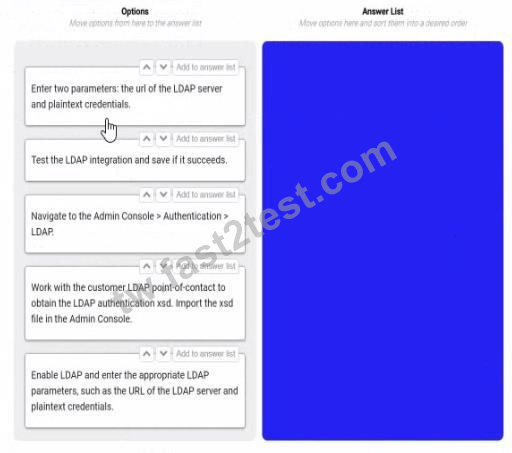
What are the next steps to configure LDAP authentication?
To answer, move the appropriate steps from the Option list to the Answer List area, and arrange them in the correct order. You may or may not use all the steps.
正確答案:

* Navigate to the Admin console > Authentication > LDAP. This is the first step, as it allows you to access the settings and options for LDAP authentication in Appian.
* Work with the customer LDAP point of contact to obtain the LDAP authentication xsd. Import the xsd file in the Admin console. This is the second step, as it allows you to define the schema and structure of the LDAP data that will be used for authentication in Appian. You will need to work with the customer LDAP point of contact to obtain the xsd file that matches their LDAP server configuration and data model. You will then need to import the xsd file in the Admin console using the Import Schema button.
* Enable LDAP and enter the LDAP parameters, such as the URL of the LDAP server and plaintext credentials. This is the third step, as it allows you to enable and configure the LDAP authentication in Appian. You will need to check the Enable LDAP checkbox and enter the required parameters, such as the URL of the LDAP server, the plaintext credentials for connecting to the LDAP server, and the base DN for searching for users in the LDAP server.
* Test the LDAP integration and see if it succeeds. This is the fourth and final step, as it allows you to verify and validate that the LDAP authentication is working properly in Appian. You will need
* to use the Test Connection button to test if Appian can connect to the LDAP server successfully.
You will also need to use the Test User Lookup button to test if Appian can find and authenticate a user from the LDAP server using their username and password.
You are reviewing the Engine Performance Logs in Production for a single application thathas been live for six months. This application experiences concurrent user activity and has a fairly sustained load during business hours. The client has reported performance issues with the application during business hours.
During your investigation, you notice a high Work Queue - Java Work Queue Size value in the logs You also notice unattended process activities, including timer events and sending notifications emails, are taking far longer to execute than normal.
The client Increased the number of CPU cores prior to the application going live What is the next recommendation?
During your investigation, you notice a high Work Queue - Java Work Queue Size value in the logs You also notice unattended process activities, including timer events and sending notifications emails, are taking far longer to execute than normal.
The client Increased the number of CPU cores prior to the application going live What is the next recommendation?
正確答案: A
說明:(僅 Fast2test 成員可見)
As part of your implementation workflow, users need to retrieve data stored in a third-party Oracle database on an interface. You need to design a way to query this information.
How should you set up this connection and query the data?
How should you set up this connection and query the data?
正確答案: D
說明:(僅 Fast2test 成員可見)